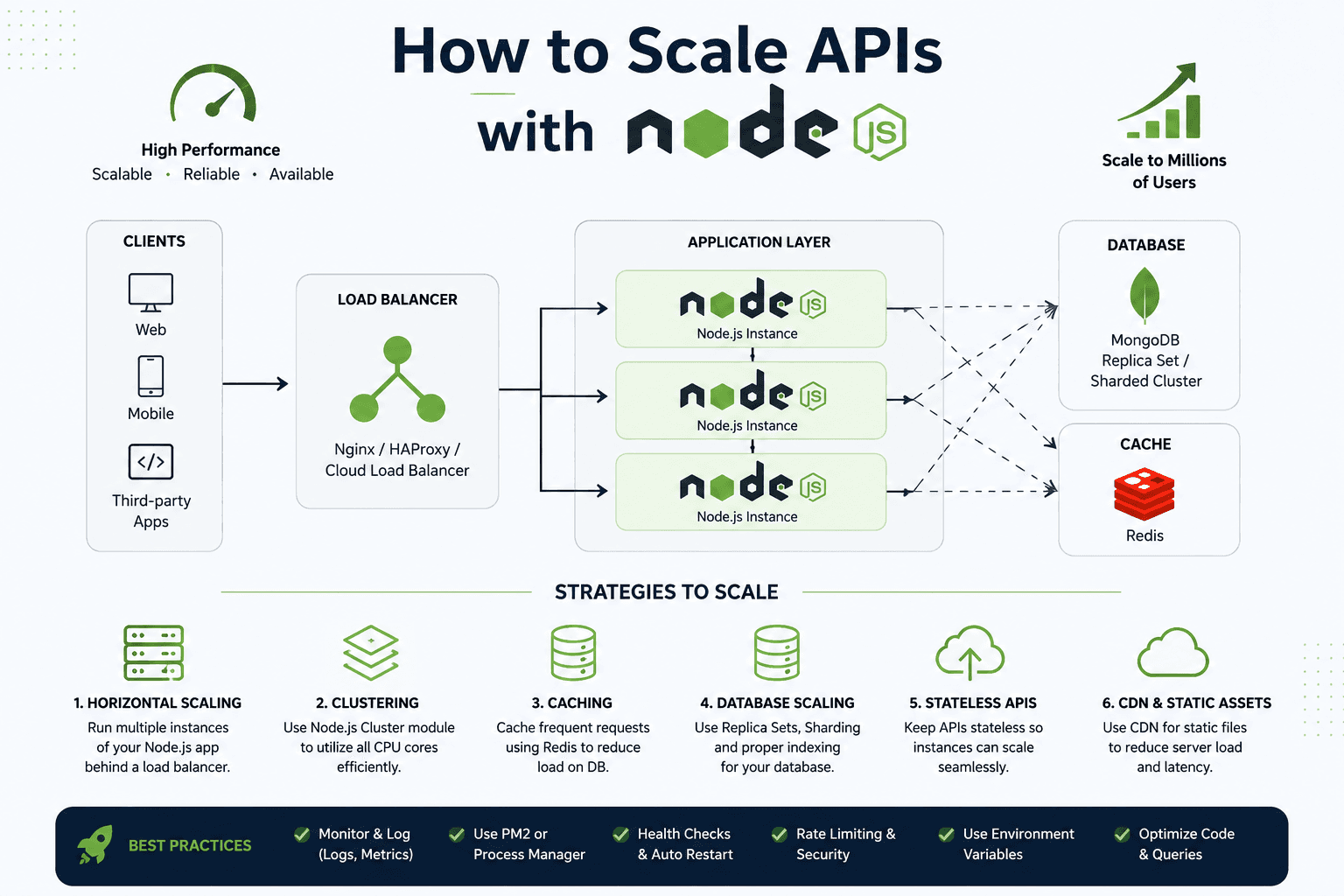
I am Sajan Acharya, a Senior Software Engineer based in Kathmandu. Scaling APIs with Node.js is not “buy a bigger EC2.” It is a deliberate architecture: clients hit a load balancer, traffic fans out to identical Node.js instances, hot reads come from Redis, durable data lives in a MongoDB replica set (or sharded cluster), and static assets leave your API via a CDN. On AWS that maps cleanly to Application Load Balancer, Auto Scaling or ECS/Fargate, ElastiCache for Redis, and CloudFront—with CloudWatch telling you whether any of it worked.
This guide follows that blueprint and the six strategies on the cover image. Measure first, then scale. If you need hands-on help, my Node.js developer services cover performance audits and AWS hardening. For API shape that stays scalable as you grow, read how to design scalable Node.js APIs.
The target architecture (what “scaled” looks like)
Web, mobile, and third-party clients should never talk to a single Node process. They talk to a load balancer—Nginx, HAProxy, or a cloud load balancer such as AWS ALB. The balancer spreads requests across N Node.js instances. Those instances share Redis for cache and sessions, and MongoDB for system-of-record data. Static files (images, JS bundles, docs) go through a CDN so the API stays focused on JSON.
# Mental model (and what you deploy on AWS)
#
#  Web / Mobile / Third-party
#            |
#     [ Load Balancer ]   ← Nginx | HAProxy | AWS ALB
#        /    |    \
#    Node   Node   Node   ← EC2 ASG | ECS/Fargate tasks
#        \    |    /
#     Redis cache         ← Amazon ElastiCache (Redis)
#     MongoDB RS/shard    ← Atlas on AWS | DocumentDB (if you choose it)
#     Static assets CDN   ← Amazon CloudFront + S3
#
$ # Sanity: you should see multiple healthy targets
$ aws elbv2 describe-target-health --target-group-arn "$TG_ARN"
# State: healthy, healthy, healthy
1. Horizontal scaling behind a load balancer
Horizontal scaling means run more identical Node.js processes, not one giant box. Each instance must be replaceable. On AWS, put them in an Auto Scaling Group or ECS service behind an ALB. Scale on CPU, request count, or custom p95 latency from CloudWatch. Vertical scaling buys time; horizontal scaling buys the next 10x—if the app is stateless.
# Local stand-in: three API processes behind a simple proxy
$ PORT=3001 node dist/server.js &
$ PORT=3002 node dist/server.js &
$ PORT=3003 node dist/server.js &
$ # Point Nginx/ALB upstream to 3001-3003
#
# AWS: desired count 3 → 3 healthy tasks/instances
$ aws ecs update-service --cluster api --service node-api --desired-count 3
2. Clustering — use every CPU core
One Node process uses one core well. On a multi-core machine, use the cluster module or a process manager so workers share the port. In containers you often run one process per task and scale tasks instead—that is still “clustering” at the fleet level. On a single VM, PM2 cluster mode or Node’s cluster module fills cores before you pay for another instance.
// cluster.js — simple multi-core bootstrap
import cluster from "node:cluster";
import os from "node:os";
import { createServer } from "./server.js";

const workers = Number(process.env.WEB_CONCURRENCY) || os.cpus().length;

if (cluster.isPrimary) {
  for (let i = 0; i < workers; i++) cluster.fork();
  cluster.on("exit", (worker) => {
    console.error(`worker ${worker.process.pid} died — restarting`);
    cluster.fork();
  });
} else {
  createServer().listen(process.env.PORT || 3000);
}

$ # Or with PM2
$ pm2 start dist/server.js -i max --name node-api
$ pm2 status
3. Caching with Redis (cut database load)
Cache frequent reads so MongoDB is not on every request. Redis (or Amazon ElastiCache for Redis) stores hot keys: public catalogs, permission snapshots, rate-limit counters. Give every entry a TTL and an invalidation rule. A cache without hit-rate metrics is hope, not architecture.
// Read-through cache sketch
async function getProduct(id: string) {
  const key = `product:${id}`;
  const cached = await redis.get(key);
  if (cached) return JSON.parse(cached);

  const product = await db.products.findById(id);
  if (!product) return null;

  await redis.set(key, JSON.stringify(product), "EX", 60); // 60s TTL
  return product;
}

$ redis-cli INFO stats | rg keyspace_hits
# Watch hit rate climb after you deploy the cache
4. Database scaling — replicas, shards, indexes
APIs die on the database more often than on Node. Use a MongoDB replica set so reads can go to secondaries when eventual consistency is fine, and shard when a single primary cannot hold the working set. Index the filters and sorts your hot endpoints actually use. An N+1 query scaled across ten Node instances is ten times the pain.
// Prefer projection + indexed filters
const orders = await db.orders
  .find({ tenantId, status: "paid" })
  .select({ _id: 1, totalMinor: 1, createdAt: 1 })
  .sort({ createdAt: -1 })
  .limit(50)
  .lean();

$ # Prove the index exists before you "scale out"
$ mongosh --eval 'db.orders.getIndexes()'
$ mongosh --eval 'db.orders.find({tenantId:1,status:"paid"}).explain("executionStats")'
# winningPlan should show IXSCAN, not COLLSCAN
5. Stateless APIs — any instance can serve any request
Store sessions in Redis or use JWTs. Keep uploads in S3, not local disk. Keep job state in a queue, not in process memory. When an ALB drains an instance, nothing precious dies with it. Stateless design is what makes Auto Scaling safe.
- No sticky sessions required for correctness (sticky is a crutch)
- Config via environment variables — different AWS envs, same image
- Health check route that verifies process + Redis + DB connectivity
- Graceful shutdown: stop taking work, finish in-flight, then exit
// GET /healthz — ALB / target group health check
app.get("/healthz", async (_req, res) => {
  try {
    await redis.ping();
    await db.command({ ping: 1 });
    res.status(200).json({ ok: true });
  } catch {
    res.status(503).json({ ok: false });
  }
});
6. CDN and static assets off the API
Images, fonts, and compiled frontend assets should not compete with API CPU. Put them on S3 (or similar) and serve through Amazon CloudFront or another CDN. Your Node instances stay free for authenticated JSON. Cache-Control headers matter as much as the CDN itself.
Best practices that keep a scaled fleet alive
The cover footer is the operating system for scale. Monitor and log with CloudWatch (or OpenTelemetry + your stack). Run under PM2 or a container orchestrator that restarts crashes. Wire ALB health checks and Auto Scaling replacement. Rate-limit abusive clients. Keep secrets in environment variables or AWS Secrets Manager—not in the repo. Optimize code and queries before you triple instance count.
$ # Rate limit sketch (per IP) — protect the fleet
$ # In Redis: INCR ratelimit:{ip} + EXPIRE 60
# if count > 100 → HTTP 429 + Retry-After

$ # CloudWatch: alarm when p99 latency or 5xx climb
$ aws cloudwatch put-metric-alarm \
  --alarm-name node-api-p99-high \
  --metric-name TargetResponseTime \
  --namespace AWS/ApplicationELB \
  --statistic p99 --threshold 0.8 --comparison-operator GreaterThanThreshold
# (wire dimensions to your load balancer / target group)- Measure p95/p99, event-loop lag, Redis hit rate, and DB slow queries before buying capacity
- Move emails, PDFs, and webhooks to queues so the request path stays boring
- Timeouts and connection pools on every outbound dependency
- Feature flags and gradual rollouts so a bad deploy does not take every instance
A simple scaling order that works
Fix the hot query and add Redis before you open the Auto Scaling max. Make the API stateless before you add a third AZ. Put static assets on CloudFront before you blame Node for bandwidth. Clustering helps one fat box; horizontal ALB targets help the product. Scaling a poorly bounded domain only multiplies the mess—so keep handlers thin and contracts clear as you add instances.
When growth outpaces one engineer, how to hire a Node.js developer covers what to screen for. If you want a measured plan for your traffic shape and AWS setup, get in touch with painful endpoints, current hosting, and CloudWatch screenshots. We can turn “scale Node.js” into ALB + ElastiCache + replicas you can operate—not a late-night firefight.